


How to prepare HubSpot CRM exports for customer data onboarding
A practical guide for turning HubSpot CRM exports into cleaner, reviewable, import-ready data before a customer launch or migration.

Marcus Hoang
Customer onboarding
HubSpot is often the system of record for the customer data that matters most during a SaaS onboarding project: contacts, companies, deals, tickets, lifecycle stages, owners, and custom properties.
That makes the HubSpot export step important. If the implementation team receives a quick spreadsheet without enough context, the real work starts later: asking what each field means, finding missing account relationships, reconciling duplicate contacts, and deciding which values should become import fields in the new product.
A better HubSpot CRM export is not just a file. It is a reviewed handoff package that helps customer success managers, implementation teams, and customer admins agree on what is ready for import before the launch timeline gets tight.
Start with the records the launch actually needs
Before exporting from HubSpot, define the launch scope. Most onboarding projects do not need every property, every historical record, and every activity on day one. They need the records that support first value.
For a CRM migration, that might include active companies, current contacts, open deals, owners, lifecycle stage, subscription or plan fields, key dates, and a small set of custom properties. For a support or customer success workflow, it might include companies, contacts, tickets, account health fields, renewal dates, and customer owner assignments.
The export should answer a simple question: which records need to work correctly in the destination product on launch day?
Confirm the HubSpot object model before export
HubSpot CRM data is organized around records such as contacts, companies, deals, tickets, and custom objects. The important implementation detail is that these records are connected. A contact may belong to a company. A deal may be associated with a company and several contacts. A ticket may need the right customer and owner context.
Before exporting, document the object model in plain language:
- Which HubSpot objects are in scope?
- Which relationships must be preserved?
- Which custom properties matter for the destination product?
- Which properties are reporting-only and can be excluded from the first import?
- Which records should be filtered out because they are inactive, test records, duplicates, or outside the launch scope?
This step protects the team from preparing a flat spreadsheet that loses the relationships the import depends on.
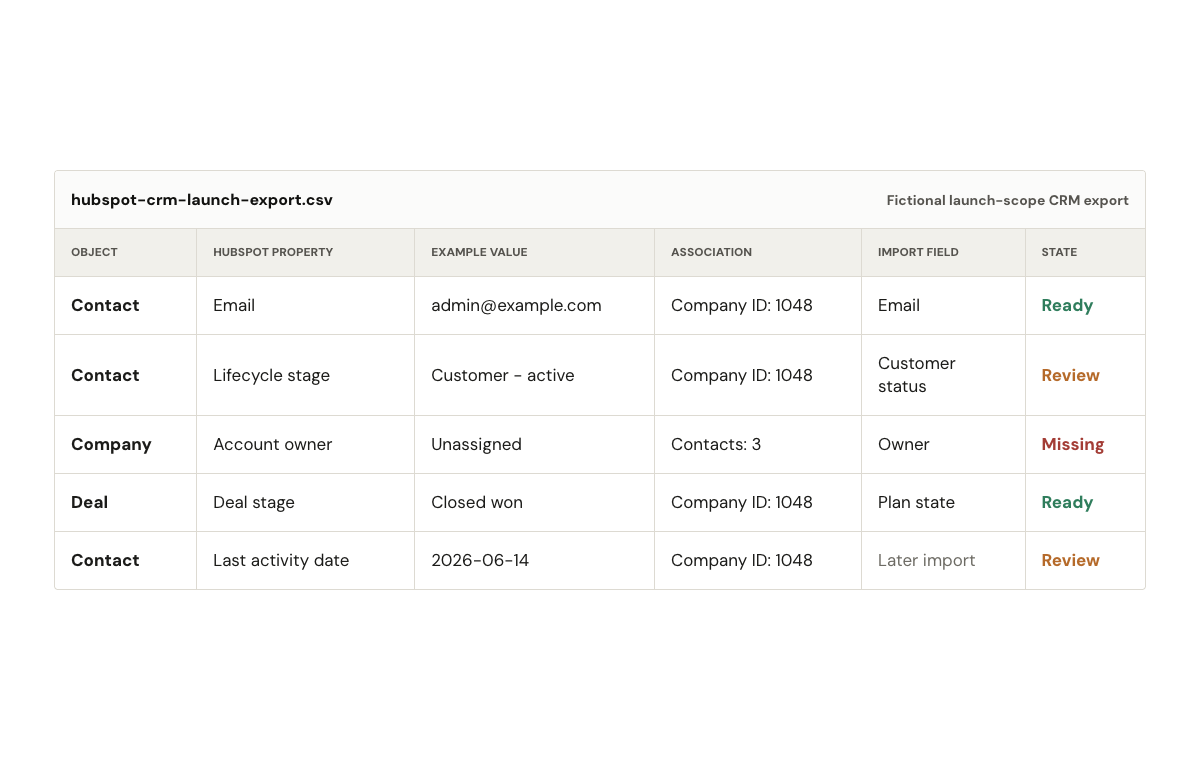
A fictional spreadsheet-style example of how HubSpot records, properties, and associations can be reviewed before import.
Export a focused view, then keep an all-properties backup
HubSpot’s record export flow lets teams export records such as contacts, companies, and deals, including current property values and associations. HubSpot’s own guide to exporting CRM records is the best source for the current click path and export options. For onboarding work, it is usually worth creating two export layers.
The first layer is the focused launch view. This is the file the implementation team works from. It should include the properties that need review, mapping, cleanup, or import.
The second layer is an all-properties backup. This is not the main working file, because it can bury the launch-critical fields under hundreds of columns. It is useful when the team needs to answer a later question about where a value came from or whether a field was available in the original export.
Keep both files tied to the same export date. If the customer changes CRM data after the export, the team needs to know whether the working file still reflects the current HubSpot state.

Photo by Luke Chesser on Unsplash.
Build a field map the customer can review
The field map turns HubSpot source fields into import fields for the destination product. It should be reviewable by both the implementation team and the customer admin.
At minimum, the map should include:
- HubSpot object, such as contact, company, deal, ticket, or custom object.
- HubSpot property name.
- Example values from the export.
- Destination import field.
- Whether the destination field is required.
- Cleanup rule, if values need to be standardized.
- Review owner, if a human decision is needed.
- Approval status.
Example values matter because field names are often misleading. A column named status might contain lifecycle stages, support states, subscription states, or internal sales process labels. The customer admin may recognize the values faster than the implementation team can infer them.
Validate required fields before mapping everything
Implementation teams can lose time mapping low-value fields while required import fields are still missing. Check required fields first.
For HubSpot CRM exports, the common validation questions are practical:
- Does every contact that should launch have an email address or another accepted unique identifier?
- Do companies have the fields the destination product requires?
- Are deal stages, ticket statuses, lifecycle stages, or customer segments valid for the new system?
- Are owner fields complete enough to assign records after import?
- Are dates in a consistent format?
- Are phone numbers, currency values, IDs, and picklist values usable without manual cleanup?
- Are record relationships present where the import requires them?
This is where import readiness becomes measurable. A file is not ready because it opened in a spreadsheet. It is ready when the required fields, formats, values, duplicates, and relationships have been checked against the import requirements.
Separate activity history from core record data
Do not assume the same export covers everything. HubSpot’s standard record exports are useful for record properties and associations, while other HubSpot data types may need separate export paths, as covered in HubSpot’s broader guide to exporting content and data. Activity history can require separate handling depending on the data type and migration goal.
That distinction should be visible in the onboarding plan. If the customer expects calls, notes, emails, meetings, or other engagement history to appear in the destination product, treat that as a separate workstream. Define what history matters, where it will go, what format the destination product accepts, and whether it belongs in the first import or a later archive.
This avoids a common launch surprise: the core contact and company records are prepared, but the customer assumed historical activity context would move with them.
Create a cleanup checklist for HubSpot exports
Use a checklist before sending the data into mapping or import preparation:
- Remove obvious test records and internal examples.
- Mark inactive records that should not launch.
- Identify duplicate contacts, companies, deals, or tickets.
- Standardize picklist values such as lifecycle stage, deal stage, region, plan, and customer type.
- Confirm required owner, account, or team assignment fields.
- Check date, phone, email, number, and currency formats.
- Preserve account-contact, company-deal, and ticket-customer relationships.
- Flag unclear custom properties for customer review.
- Record which fields were excluded and why.
- Save the export date, filter criteria, and approval state.
The strongest checklist items are tied to import requirements. If a field does not affect launch, reporting, customer workflow, or downstream customer success work, it should not distract the team from the fields that do.
Turn the export into an import-ready handoff
The handoff should give the next person enough context to trust the file. For a HubSpot CRM export, that usually means more than the cleaned spreadsheet.
Include a short validation summary, a field map, a list of cleanup rules, duplicate decisions, relationship notes, excluded records, open customer questions, and approval status. If the data changed across versions, note what changed and when.
Aformity is built around this kind of customer data onboarding work: inspecting messy customer files or exports, validating records against import requirements, mapping source fields to import fields, and preparing data into an import-ready shape. The operating habit matters as much as the tooling. The team needs a repeatable way to move from customer export to reviewed, validated, import-ready data.
A simple readiness rule
Use this rule before calling a HubSpot export ready:
The file is ready when the launch-critical records are in scope, required import fields are present, values are valid, duplicates are handled, relationships are preserved, open questions have owners, and the customer or implementation team has approved the decisions that cannot be inferred from the data.
That level of preparation reduces avoidable spreadsheet loops and gives the launch team a clearer path from CRM export to customer go-live.

Get launch-ready data faster.
Sign up to map, validate, and approve customer files before onboarding stalls.
By signing up, I agree to Aformity's Terms of Service and Privacy Policy.